
What happens after a Microsoft 365 account is compromised? An attack scenario
18 August 2026

An employee receives a message asking them to sign in to Microsoft 365 again. The page looks familiar, so they enter their username and password and approve an MFA request. A few minutes later, a cybercriminal signs in to their account. The user continues receiving email and working as usual. For the attacker, however, this is only the beginning.
An employee receives a message asking them to sign in to Microsoft 365 again. The page looks familiar, so they enter their username and password and approve an MFA request. A few minutes later, a cybercriminal signs in to their account. The user continues receiving email and working as usual. For the attacker, however, this is only the beginning.
This illustrative scenario shows a Microsoft 365 account takeover from an organisation’s perspective: not just mailbox access, but control of a digital identity connected to Exchange Online, Teams, SharePoint, OneDrive, Entra ID and often external SaaS applications. One successful phishing attempt can therefore lead to business email compromise, data theft, financial fraud or further account takeovers.
Useful insights
- A compromised Microsoft 365 account provides access to more than email, including documents, conversations, applications and business context.
- The first actions are often quiet: exploring the mailbox, payment processes and available permissions.
- MFA reduces risk but does not protect against every scenario, including token theft, MFA fatigue and consent phishing.
- A single alert does not establish that an incident has occurred. Its significance emerges by correlating identity, device and activity across services.
- Response does not end with a password change. It covers sessions, MFA, applications, persistence mechanisms and scope analysis.
- A 24/7 SOC shortens the path from signal to decision, before the account is used for fraud or data theft.
What a Microsoft 365 account takeover really means
Traditionally, an email mailbox was one of many workplace tools. In Microsoft 365, an account represents a user and mediates access to the organisation’s services, data and processes. Risk depends on licensing, configuration, permissions and integrations, but a typical account may provide access to:
- correspondence, calendars, contacts and the address book in Exchange Online;
- conversations, meetings and files shared through Teams;
- documents in SharePoint and OneDrive;
- applications using Microsoft Entra ID sign-in;
- project information, contracts, invoices, customer data and supplier communications;
- resources available through SSO;
- administrative functions if the compromised account has elevated privileges.
The theft of a single identity can be far more serious than a leaked password. An attacker may use a legitimate session and the user’s assigned permissions, making some actions look like normal work.
| Stage | Attacker action | Potential objective | Risk to the organisation |
|---|---|---|---|
| Gaining access | Signing in with a password, token or OAuth consent | Entering the environment | Loss of control over the identity |
| Discovery | Searching email, contacts and calendars | Learning relationships and processes | Preparing convincing fraud |
| Concealing activity | Mailbox rules, forwarding, deleting or moving messages | Delaying detection | Longer attacker dwell time |
| Exploiting trust | Messages to employees, customers or suppliers | BEC and internal phishing | Financial losses and further account compromise |
| Accessing data | SharePoint, OneDrive, Teams and SaaS applications | Stealing information | Loss of confidentiality and legal obligations |
| Maintaining access | A new MFA method, OAuth consent, delegation or other changes | Surviving a password reset | Incident recurrence |
How Microsoft 365 account takeovers happen
There is no single route to account takeover. In practice, attackers may compromise credentials, an active session or an application’s permissions.
- Credential phishing: the user enters credentials on a fake sign-in page, and the attacker uses them to access Microsoft 365.
- MFA fatigue and social engineering: the victim approves an authentication request they did not initiate.
- Session token theft: a stolen, already authenticated session can be used without re-entering the password or completing a new MFA challenge. Microsoft describes this scenario in its token theft playbook.
- Consent phishing: the user grants an OAuth application access to data. Changing the password does not remove that consent; it must be identified and revoked separately.
- Weak or reused passwords: credentials exposed on another service may be used in credential stuffing or password spraying.
Risk increases when an organisation retains MFA exceptions, unused accounts, poorly protected privileged roles or legacy authentication methods.
The first minutes after sign-in
The attacker’s first goal is often not to send thousands of messages. Noisy activity would quickly trigger alerts and attract the user’s attention. Quiet reconnaissance is far more valuable.
The attacker searches for invoices, contracts, customer names and payment information. They study communication styles, ongoing projects, decision-makers and access to Teams, SharePoint, OneDrive and applications through SSO. They also check whether the account has elevated privileges or can grant application consent.
This is where a technical incident begins to become a plan for business fraud.
‘The greatest danger in an account takeover is often not the sign-in itself, but the time the attacker has to study the organisation undisturbed. The longer they remain undetected, the easier it becomes to turn technical access into convincing fraud, data theft or another takeover.’
What the cybercriminal does next
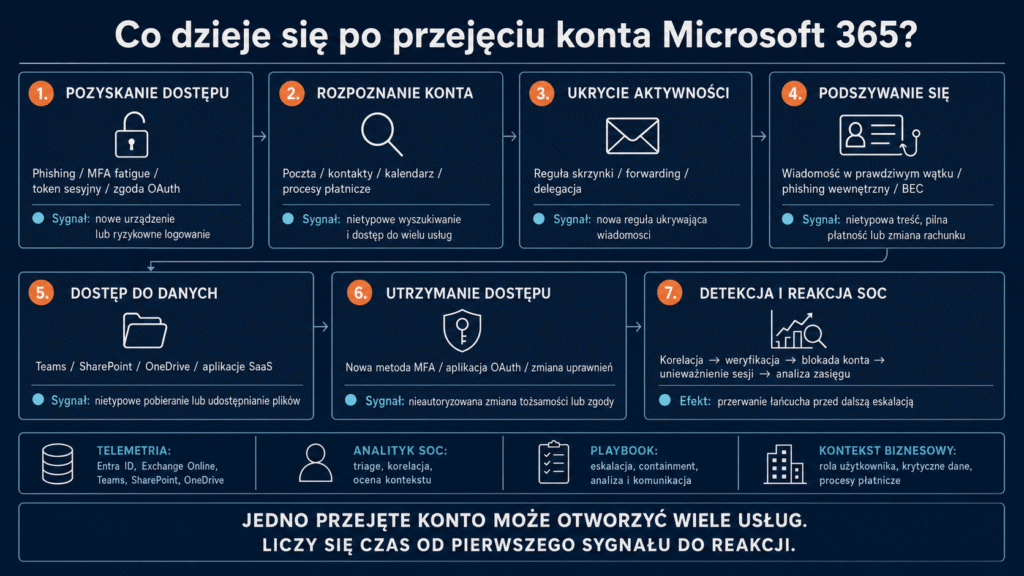
After reconnaissance, the attacker chooses actions suited to the victim’s role and the value of accessible data. Not every incident follows the same path, but four themes recur: concealing activity, exploiting trust, accessing data and maintaining a foothold.
Conceals correspondence
Creates rules that move or delete selected messages. The attacker may also configure forwarding or delegation to conceal warnings and retain control of a conversation.
Impersonates the user
Sends messages from the real account within an existing thread. An urgent request to change bank details, send documents or visit a phishing page becomes more credible. This is how business email compromise develops.
Accesses Teams, SharePoint and OneDrive
In Teams, the attacker can impersonate an employee; in SharePoint and OneDrive, they can search for contracts, personal data and financial files. Unusual downloads and sharing must be assessed against the user’s normal activity.
Tries to maintain or expand access
The attacker may add an MFA method, exploit OAuth consent, change permissions or target further users. An administrator account dramatically increases the potential scope of the incident.
Check whether you can see all activity associated with a compromised identity
One account can open access to a substantial part of the environment. In VigilHorizon’s approach, activity from Entra ID, Exchange Online, SharePoint, OneDrive and security tools is analysed in a single context, and a confirmed incident activates an agreed playbook. Check whether your organisation has the same connected path from signal to decision.
Consequences for the organisation
The impact of an account takeover depends on the account’s role, permissions, attacker dwell time and response speed. The main risk categories are:
- financial losses —fraudulent changes to bank details, urgent transfers, supplier impersonation or executive fraud;
- loss of confidentiality —access to email, files, customer data, employee records or contracts;
- further account takeovers —phishing sent from a trusted account is more convincing;
- reputational damage —fraudulent messages reach customers and partners from a genuine account;
- operational disruption —blocked accounts, suspended payments and manual review of correspondence;
- legal and contractual obligations —assessing the breach, preserving evidence and making any required notifications;
- technical escalation —using the account as an entry point to other applications, resources or privileged identities.
The event must not be treated solely as one user’s problem. The investigation must establish whether email, data, applications, external relationships and other accounts were also affected.
Why MFA and a conventional approach are not enough
MFA remains one of the most important controls, but not every method provides the same protection. A push notification or one-time code can be exploited through social engineering or intercepted by advanced phishing. An active session token can bypass a new authentication challenge.
A mature approach therefore goes beyond ‘we have MFA’. It includes phishing-resistant methods for critical roles, Conditional Access, control over MFA registration and application consent, and analysis of unusual sessions outside office hours as well.
Microsoft identifies passkeys/FIDO2, Windows Hello for Business and certificate-based authentication as phishing-resistant methods. Deployment should follow the architecture, risk assessment and a prepared access recovery process, rather than a single setting change.
Conventional approaches also fail when logging is enabled but nobody reviews it, alerts remain in separate consoles and authority to block an account is unclear. This is the difference between visibility and response capability, explored in What a 24/7 SOC is and why monitoring alone is not enough.
Which signs may indicate an account takeover?
No single indicator necessarily means an attack. A sign-in from another country may reflect travel or a VPN, and bulk downloads may be part of a legitimate migration. Effective detection correlates several behaviours with the user’s profile and business context.
| Indicator | Where to find context | What increases the risk | Possible SOC response |
|---|---|---|---|
| Unusual location or IP address | Entra ID sign-in logs, IP reputation and user history | New device, unusual application or risky session | Verify with the user and assess session risk |
| Impossible Travel | Entra ID / Defender for Cloud Apps, known VPNs and locations | No plausible explanation and further anomalies | Correlation, higher priority and containment |
| New mailbox rule or forwarding | Exchange Online, Microsoft Purview Audit | The rule hides financial messages or warnings | Review rules, delegations and messages |
| New application or OAuth consent | Entra ID, enterprise applications and consent logs | Broad permissions or an unknown publisher | Analyse the application and revoke unauthorised consent |
| Unusual file downloads or sharing | SharePoint, OneDrive, Defender and Purview | High volume, a new device or external recipients | Restrict access and assess affected data |
Detection availability, retention and event detail depend on licensing and configuration. Microsoft 365 monitoring should therefore start with risk scenarios and required data sources, not just a product list.
How a SOC detects a Microsoft 365 account takeover
An effective Microsoft 365 SOC should not rely on a single console. It needs a consistent view of identity, email, data, applications and endpoints. A typical process is:
- Signal collection: a risky sign-in alert, new mailbox rule, unusual file access or user report.
- Enrichment: IP reputation, device, location, authentication method, user role and data criticality.
- Correlation: checking account activity before and after sign-in across Exchange, Teams, SharePoint, OneDrive and Entra ID.
- Classification: distinguishing legitimate anomalies from suspicious activity and assessing potential impact.
- Escalation: contacting the user, IT, business process owner or incident response team according to the playbook.
- Containment: blocking the account, revoking sessions and taking other actions within the agreed scope.
- Scope analysis: establishing whether similar indicators appear on other accounts and whether BEC or exfiltration occurred.
The SOC adds value between the alert and the action. A tool may flag ‘Impossible Travel’, but an analyst must consider VPN use, travel, known addresses and post-sign-in activity. A seemingly less critical mailbox rule can become highly significant when created minutes after a sign-in from a new device and targeting payment messages.
Illustrative scenario: from phishing to attempted business email compromise
The following sequence is an illustrative example of the process, not a real client case or a guaranteed detection time. A purchasing employee opens a fake sign-in page. Minutes later, the account searches email, creates a rule hiding financial messages and opens documents in SharePoint and OneDrive.
| Illustrative time | Event | Assessment of the individual signal | Significance after correlation |
|---|---|---|---|
| 09:11 | Sign-in from a new environment | Potentially legitimate anomaly | Requires observation of subsequent activity |
| 09:16 | Unusual email searches | Ambiguous | Strengthens suspicion after a risky sign-in |
| 09:21 | New rule hiding messages | High risk | A common BEC concealment mechanism |
| 09:24 | Access to numerous financial files | Could be work-related | Unusual pattern and possible data reconnaissance |
| 09:28 | Attempt to send a bank account change message | Critical | Confirms active misuse of the account |
The SOC correlates the sequence and uses another channel to confirm that the user did not initiate the activity. The account is blocked, sessions revoked, and the investigation covers the mailbox, MFA, applications, data and other accounts with similar indicators.
The main outcome is breaking the chain before a fraudulent payment succeeds. This comes from combining telemetry, an analyst, a playbook and business context—as in VigilHorizon’s approach to compromised accounts.
What response looks like, step by step
In its guidance on responding to a compromised Microsoft 365 account Microsoft recommends actions including blocking the account, revoking access and reviewing MFA and applications. The playbook should cover five layers.
1. Restrict access
- block sign-in and revoke active sessions;
- change the password and account for the on-premises directory in a hybrid environment;
- check other access methods, including application passwords and legacy protocols, if used.
Setting a new password alone must not close the case. Existing access must be terminated separately, and mechanisms that may work independently of the password must be assessed.
2. Remove persistence mechanisms
- remove unknown MFA methods and devices;
- revoke unauthorised OAuth consent, delegations and permission changes;
- check mailbox rules, forwarding and other access mechanisms created.
3. Establish the incident’s scope
- reconstruct activity from the first suspicious sign-in;
- check
MailItemsAccessed, rules, messages, files and applications; - look for the same indicators on other accounts and assess whether BEC or data exposure occurred.
4. Communicate and restore safely
- notify process owners and recipients of fraudulent messages through a verified channel;
- suspend suspicious payments or changes to counterparty details;
- restore the account only after removing persistence, re-registering MFA and confirming control.
5. Lessons learned
After the incident, establish why the attack succeeded, what data was missing and where response time was lost. This is part of a complete Incident Response.
How to reduce account takeover risk
Effective protection combines prevention, detection and response. No single control covers the entire attack chain.
- Deploy phishing-resistant MFA, especially for administrators and critical roles.
- Use Conditional Access with regard to risk, device status and resource sensitivity.
- Limit permissions and exceptions, separate administrative accounts and disable unused identities.
- Control OAuth applications, MFA registration, delegations and mailbox rules.
- Ensure useful logging from Entra ID, Exchange, SharePoint, OneDrive, Teams and applications.
- Correlate identity with email, data and endpoints instead of reviewing each console separately.
- Assign alert ownership and 24/7 escalation so signals do not wait until morning.
- Protect payments through second-channel verification independent of email and Teams.
- Practise the compromised account playbook covering BEC, tokens, OAuth and communications.
- Measure detection and response times using the principles described in the article MTTD and MTTR — why detection time determines incident impact.
If the organisation cannot confirm several of these elements, it may have technical controls but still lack a complete account takeover response capability.
Summary
A Microsoft 365 account takeover goes beyond access to email. One identity can lead to documents, messaging platforms, business applications and customer data. Attackers use it for reconnaissance, BEC, data theft and persistence.
Effective protection requires phishing-resistant methods, Conditional Access, application controls, comprehensive telemetry and a team able to turn signals into decisions.
If you are unsure whether your organisation would detect this scenario in time, review log coverage, detection rules, response permissions and the compromised account playbook. The VigilHorizon SOC 24/7 plan combines monitoring, event analysis, correlation and response under agreed procedures—from the first anomaly to incident containment.
Frequently asked questions (FAQ)
Does MFA prevent Microsoft 365 account takeover?
MFA significantly reduces risk but does not provide complete protection against MFA fatigue, token theft or consent phishing. It should be supported by phishing-resistant methods, Conditional Access, monitoring and a response process.
What is business email compromise?
Business email compromise, or BEC, is fraud that exploits trust in business communications. A compromised genuine mailbox makes requests for money, data or further credentials more convincing.
Is changing the password enough after an account takeover?
No. You must also revoke sessions, review MFA, OAuth applications, mailbox rules and permissions, then determine the scope of access and check other accounts.
How long can an attacker retain access after a password change?
It depends on the session, application and compromise mechanism. Changing a password does not replace explicitly revoking access or reviewing consent and other persistence mechanisms.
What does an Impossible Travel alert mean?
It indicates activity from two locations within less time than a realistic journey would take. It is a risk indicator, not proof of compromise; analysis must consider factors such as VPN use, the device and subsequent activity.
How do you detect a malicious Microsoft 365 mailbox rule?
Review current rules, forwarding and change audit logs. Mechanisms hiding payment messages, warnings or partner replies are particularly suspicious.
Can an attacker gain access without knowing the password?
Yes. They may use a stolen session token or OAuth application permissions granted by the user. Analysis must therefore cover sessions, devices and applications, not just password changes.
Which logs are needed to investigate the incident?
Logs from Entra ID, Exchange Online, SharePoint, OneDrive, Teams, applications and OAuth consent are needed. Depending on the scenario, endpoint, proxy, VPN, DNS and other SaaS data may supplement them.
Can a SOC monitor Microsoft 365 around the clock?
Yes, provided it has the appropriate data, detections, analyst coverage, playbooks and escalation permissions. Simply forwarding alerts is not a complete SOC service.
What should you do if fraudulent messages were sent from the compromised account?
Stop the campaign, warn recipients through a verified channel and investigate further compromises. If a transfer was requested, involve finance and the bank immediately.
Learn more
- What is SOC 24/7? How a Security Operations Center works and why monitoring is not enough
- Incident Response: responding to a cyberattack step by step
- EDR, XDR and MDR — how they differ and when they protect your business
- MTTD and MTTR — why detection time determines incident impact
- SIEM in your company — why deployment alone does not improve security
Related articles



Not sure which plan is right for your business?
Complete a short questionnaire
Complete the form and we will help you select monitoring, incident handling or availability support for your organisation. We will agree the scope and service conditions before work begins.