
What does a cyberattack on a city council look like? An incident scenario, step by step
3 October 2026

What does an attack on a city or municipal office involve? Explore a realistic incident scenario, its effect on public services and the role of SOC and security monitoring.
It is 08:00. Staff log in to email, electronic document management and departmental systems. Residents begin arriving at 08:30. At 09:05, electronic document management stops responding; at 09:20, the local tax system follows. By 09:40, departments switch to paper.
At 11:15, IT links the failures to activity that began the previous night after an account was compromised. Residents cannot check their cases, staff cannot access documents and management does not know which services can safely be restored.
This illustrative scenario shows what a cyberattack on a municipal office looks like. It does not describe a specific authority. An unavailable website may be the least of the consequences. Losing the ability to fulfil responsibilities and serve residents is more serious.
Useful insights
- A cyberattack on a municipal office can begin with phishing, a compromised account, a vulnerable service or poorly protected remote access.
- Data loss is not always the greatest consequence. Unavailable document management, email, tax, registry or identity systems can restrict public service delivery.
- An alert is not a response. Analysis, correlation, prioritisation, escalation and authority to act are needed.
- Paper procedures help sustain some tasks, but do not replace access to current data, integrations and verified identity.
- Municipal resilience combines risk reduction, monitoring, SOC, Incident Response and tested service recovery in an agreed order.
An illustrative municipal cyberattack scenario
This scenario does not describe a VigilHorizon customer incident or a particular local authority. It shows typical dependencies and decisions without commands, tools or attack instructions.
The previous day — initial access
An employee receives a message resembling correspondence about an invoice, document or service. Initial access may also come from a compromised remote account or a vulnerable service. Nothing stops immediately, but a path into IT opens.
Night—reconnaissance and expanding access
Unusually timed logins, new access and activity between systems appear. The attacker seeks accounts, servers and trust relationships. Observable behaviour is what matters to defenders.
08:00–09:20 — the disruption begins to affect the office
In the morning, staff see separate problems with email, login, document management and tax systems. Reports reach different people and, without a shared picture, resemble several unrelated outages.
09:40 — contingency working begins
Departments use paper forms. Some applications can be accepted, but case status, balances, correspondence and registers remain uncertain. A backlog grows for reconciliation after systems return.
11:15 — the office recognises the cyberattack
The team connects the outages with overnight events, determines scope, preserves evidence, limits impact and assesses reporting and recovery priorities. Data integrity and account security must also be confirmed.
| Stage | What happens in the environment | Impact on the office and residents |
|---|---|---|
| Initial access | a compromised account or exploited vulnerability | no visible outage, but risk begins |
| Discovery | unusual use of accounts, servers and shares | more assets require investigation |
| Lateral movement | activity reaches further devices and accounts | the office loses trust in parts of its environment |
| Server access | document management, email, finance or registries are at risk | departments lose access to data and processes |
| Encryption or unavailability | services stop responding | services for residents are restricted |
| Response and recovery | isolation, analysis, restoration and validation | contingency working continues until services return safely |
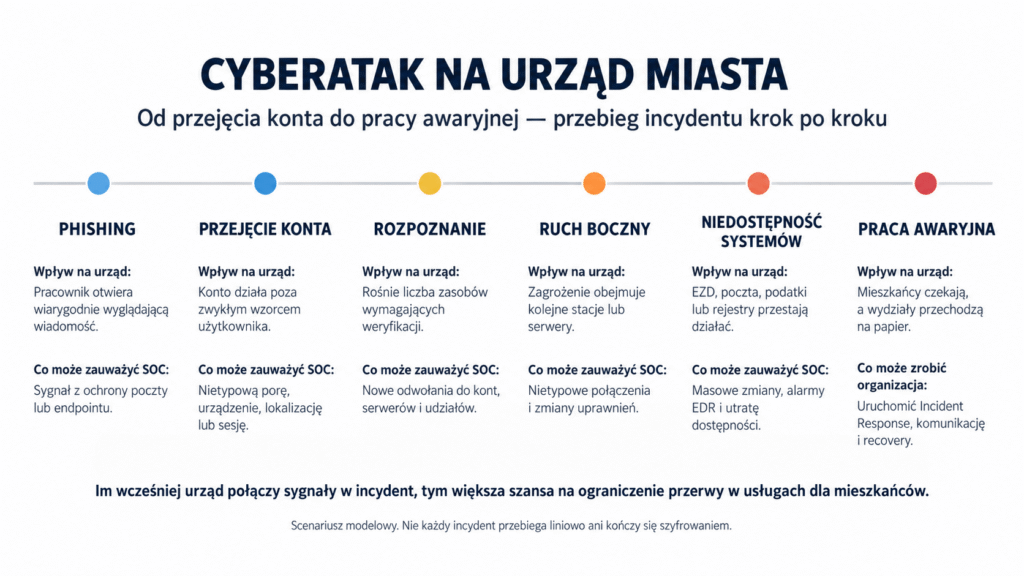
Why public administration is targeted
A municipal office handles resident, property, tax, benefit and case data. It connects central systems, departmental applications, document management, email, identity and supplier solutions. Each integration adds dependencies.
The importance of public services creates time pressure. Deadlines and residents’ needs remain when tax or document systems fail. Pressure to restart quickly may precede a full understanding of the incident.
With limited resources, administrators maintain many areas, and security analysis competes with daily requests. Suppliers support systems, but a single response owner may be missing.
An attack may seek extortion, data theft or disruption. Preparation does not require knowing the motive, but does require identifying critical services, dependencies and decisions.
How the attack begins
Phishing is not the only entry point. Initial access may result from stolen credentials, a vulnerable service, supplier access, an outdated device or misconfiguration.
Initially, behaviour can resemble normal work: an account logs in outside usual hours, uses a new device or accesses a new resource. Account history, the user’s role and other events give the signal meaning.
MFA reduces risk, but must cover the appropriate services, administrators and remote access. An exception for an old application remains a weaker point. Email filtering, EDR and firewalls likewise cannot guarantee stopping every event.
That is why IT security audit should verify actual conditions: MFA coverage, privileged accounts, supplier access, segmentation, backups and the path from alert to decision.
What happens after access is obtained
After initial access, the attacker expands their options. Signs include unusual account use, new connections, privilege changes and server activity. Delayed analysis increases the number of systems requiring investigation.
Identity systems link users, devices and permissions. Losing trust in administrator accounts complicates isolation and recovery because it becomes unclear which credentials are trustworthy.
Electronic document management supports case flow, assignment, deadlines and accountability. Email supports communication, finance and tax systems support settlements, and registries support departmental work. Losing several services affects the entire authority.
Encryption may be the visible stage, but an incident can disrupt operations without it. An office may shut systems down if it cannot confirm data integrity or access scope. That can be safer than a rushed restart.
What are the consequences for residents?
For residents, an attack means a closed service desk, unavailable case information or an inability to confirm payment. A paper application can be accepted, but registration and processing may be postponed.
For staff, contingency working means handwritten notes, additional checks and backlogs. Once systems return, documents must be entered, statuses reconciled and omissions or duplicates ruled out.
Management sets service priorities, communication, shutdowns and reporting obligations. Potential effects on personal data require a separate assessment; not every cybersecurity incident is automatically a personal data breach.
Cybersecurity supports continuity of public responsibilities. If an office does not know which services must return first or how long contingency working can continue, it should start with impact and dependency analysis.
The most serious consequence of an attack on a municipal office is not an on-screen message. It is losing the ability to serve residents efficiently, securely and accountably.
How a SOC can detect a developing attack
The SOC does not receive a single alert naming the entire incident. It analyses signals from email, Microsoft 365, identity, EDR/XDR, SIEM, networks, servers and applications. Correlation creates value by connecting an unusual login with device activity, new access and the service’s importance to the office.
| Scenario stage | What the SOC may notice | Possible response |
|---|---|---|
| Phishing | an email security signal, user report or endpoint activity | analysis of the message, account and device |
| Unusual sign-in | a new time, location, device or pattern | SIEM correlation and session verification |
| Permission change | privileged account activity or group changes | a high-risk alert and escalation |
| Lateral movement | new connections between workstations and servers | controlled isolation under the playbook |
| Server access | unusual activity around document management, email, finance or backup | broader investigation and Incident Response |
| Attempted encryption | mass file changes, EDR alerts and lost availability | impact containment and recovery coordination |
’May’ is crucial. Detection depends on log quality, connected sources, rules, retention, knowledge of critical assets and analyst readiness. The SOC does not replace administrators, authority leadership or service owners, but helps shorten the path from signal to decision.
That is why SOC 24/7 should not be equated with a dashboard or alert inbox. VigilHorizon’s model includes analysis, classification, escalation and response support under previously agreed rules.
The first 60 minutes after detection
The first hour builds a shared picture, limits impact and preserves evidence. Actions must follow service priorities and decision-making authority.
| The developing threat | The SOC and office in the first 60 minutes |
|---|---|
| uses an active session or account | verify the user, session scope and need to block access in a controlled way |
| tries to reach further assets | correlate logs, identify hosts and isolate selected elements under the playbook |
| increases its impact on servers | protect privileged accounts, preserve evidence and engage service owners |
| approaches critical systems | prioritise document management, tax, registries, email and identity infrastructure |
| complicates recovery | check backup status without connecting unverified copies to the affected environment |
| causes visible unavailability | activate communication, contingency working and assessment of reporting obligations |
Early response does not guarantee there will be no downtime. It may, however, reduce the accounts and systems requiring investigation, preserve better evidence and narrow the recovery scope. Incident Response structures this hour through roles, priorities and documented decisions.
How NIS2 and Poland’s National Cybersecurity System help limit impact
NIS2 is not a shopping list of products. It connects risk management with incident handling, continuity, supplier security, access control, training and assessment of control effectiveness. An office should be able to demonstrate not just that a procedure exists, but that it works.
In Poland, the amendment to the National Cybersecurity System Act implementing NIS2 entered into force on 3 April 2026 (ISAP, Journal of Laws 2026, item 252). The obligations and status of a particular authority must be determined under the current Act, the entity’s role, its services and applicable provisions. Offices should not adopt an identical model based solely on their designation.
Monitoring helps identify events, but operational compliance also requires classification, escalation, documentation and response. Continuity plans and recovery are equally important. The article NIS2 and security monitoring explains why the rules do not mandate a single tool or reduce resilience to the SOC alone.
An NIS2 compliance audit should therefore begin by establishing the applicable legal scope, then compare requirements with evidence: risk analysis, asset registers, incident handling, continuity tests, supplier oversight and exercise results.
What Incident Response looks like in a municipal office
Incident Response starts before an incident. The office establishes who leads response, blocks accounts, assesses impact, contacts suppliers and owns communication and reporting.
After detection, the team determines scope, preserves logs and other evidence, limits further threat activity and checks whether technical decisions could interrupt additional services. Not every machine should be switched off immediately or restored first. Impact analysis should determine priority.
Next, the cause must be removed, affected credentials changed, configurations checked and a safe recovery point selected. Restoring a server is not the same as restoring a service. Integrations, user access, data consistency and documents accumulated during contingency working must be checked.
Finally, lessons inform updates to detection, procedures, contacts and remediation plans. The incident ends when the cause, scope and effectiveness of actions are understood, not simply when the login screen returns.
How to reduce risk and prepare the office
1. Identify services and dependencies
Identify the responsibilities whose disruption would most affect residents, and the systems, identities, networks and suppliers required to deliver them. Use this to define RTO, RPO and recovery order.
2. Apply MFA to the right scope
MFA should protect email, Microsoft 365, VPN, privileged accounts and supplier remote access. Exceptions need an owner, justification, deadline and compensating control.
3. Segment networks and restrict privileges
An employee workstation should not have unnecessary paths to every server. Separate administrative roles, restrict service accounts and regularly review former employees’ and contractors’ access.
4. Provide round-the-clock event analysis
Email, identity, EDR/XDR, firewalls, servers and applications should provide useful signals. VigilHorizon can support the office with SOC 24/7, but scope must follow critical services, available data and agreed playbooks.
5. Manage vulnerabilities and suppliers
Inventory systems, versions, owners, support agreements and support end dates. Supplier access should be enabled under control, logged and limited to what is necessary.
6. Exercise scenarios with leadership and departments
An exercise should establish who decides, how the office operates without document management, how residents are informed, which channels remain available and when recovery starts. An untested procedure remains an assumption.
7. Protect and test recovery
Backups should be isolated, controlled and tested. SecureVault complements VigilHorizon’s detection and response through backup, Disaster Recovery and business continuity preparation. A copy is necessary, but only a tested process shows whether a service can return within the required time.
8. Assess readiness through an audit
An audit should connect technology, process and legal requirements. If the office does not know its logging coverage, incident roles or recovery order, a joint assessment of security, NIS2/Poland’s National Cybersecurity System and the SOC model turns uncertainty into a plan with owners and deadlines.
| Question | Answer |
|---|---|
| Do critical services and their dependencies have owners? | YES / NO |
| Are alerts analysed at night, at weekends and on holidays? | YES / NO |
| Does MFA cover email, remote access and privileged accounts? | YES / NO |
| Does the office have playbooks for account compromise and ransomware? | YES / NO |
| Do departments understand contingency working procedures? | YES / NO |
| Are backups isolated and regularly restored in tests? | YES / NO |
| Have roles, communication and reporting obligations been exercised? | YES / NO |
| Has the scope of Poland’s National Cybersecurity System/NIS2 been confirmed for this authority? | YES / NO |
Summary
A cyberattack on a municipal office goes beyond an unavailable website or encrypted server. It can stop document workflows, local taxation, communication, registry access and case handling. Paper procedures reduce some consequences but create backlogs and cannot replace trustworthy systems.
Resilience combines controls, visibility and prepared decisions. MFA, segmentation and vulnerability management reduce risk. Monitoring and SOC shorten the path from signal to analysis. Incident Response structures roles, isolation and communication. Backup, Disaster Recovery and exercises enable a controlled service return.
If the office does not know who analyses overnight alerts, which systems are restored first or how decisions are documented, start by assessing reality. VigilHorizon can identify gaps in auditing, detection and response; SecureVault can identify gaps in backup and recovery. A tailored plan protects infrastructure and, above all, continuity of services for residents.
1. Why are municipal offices targeted by cyberattacks?
They process substantial data, rely on many systems and suppliers and deliver services whose disruption quickly affects residents. Pressure to restore operations can increase the consequences of an incident.
2. Does a cyberattack on a municipal office mean only an unavailable website?
No. An attack can affect email, identity, electronic document management, local taxes, finance, registries and infrastructure. The website is only one possible component.
3. How does an attack on a municipal office usually begin?
Entry may involve phishing, a compromised account, a vulnerable service, misconfiguration or poorly secured remote access. No single sequence applies to all incidents.
4. Is MFA enough to protect a municipal office?
No. MFA significantly reduces account-compromise risk, but needs appropriate coverage and exception control. It must work with monitoring, segmentation, updates and response.
5. Is a SOC needed in public administration?
An office needs risk-appropriate capabilities to detect, analyse and handle events. These can be internal, external or hybrid; the model’s name matters less than actual readiness.
6. How does monitoring differ from a SOC?
Monitoring supplies an alert. The SOC assesses context, correlates signals, classifies the event and initiates agreed escalation or response. A notification does not make decisions.
7. What should an office do during the first hour of an incident?
Confirm the event, establish scope, preserve evidence, limit further impact, activate roles and communication, and assess reporting obligations. Actions should follow the playbook.
8. Do all offices have identical NIS2/National Cybersecurity System obligations?
This should not be assumed. Status and obligations require assessment under Poland’s current National Cybersecurity System Act, considering the authority’s type, role, services and systems.
9. Must every cyber incident be reported?
The procedure depends on the event, its classification, entity status and applicable law. The office should have a process that quickly identifies channels, deadlines and responsible people.
10. Is backup enough after ransomware?
No. Safe copies, a known recovery point, infrastructure, system sequencing, testing and data validation are needed. The complete process restores the service.
11. How can an office operate while systems are unavailable?
Through prepared contingency procedures, alternative communication and paper handling of selected cases. Subsequent reconciliation and data entry must also be planned.
12. Where should an office start improving cybersecurity?
Identify critical services, dependencies and owners. Then assess identity, remote access, segmentation, monitoring, Incident Response, backup, recovery and applicable NIS2/National Cybersecurity System requirements.
Learn more
- NIS2 and security monitoring — which requirements must actually be met?
- What is SOC 24/7, and why is monitoring not enough?
- Incident Response: responding to a cyberattack step by step
- NIS2 compliance audits — how should an organisation prepare?
- IT security audits — what do they cover, and when are they useful?
Related articles



Not sure which plan is right for your business?
Complete a short questionnaire
Complete the form and we will help you select monitoring, incident handling or availability support for your organisation. We will agree the scope and service conditions before work begins.